Friday, September 2, 2011

Reconciling File Times Between Unix and Windows

I did some enhancements for AnyBackup not too long ago that required comparison of hash keys generated using (in part) files' last modified time. I discovered an oddity that, despite years of being on the platform, I'd never known about Windows. File meta data has a resolution of 2 seconds. Don't believe me? Take a closer look. What this means is that the modified time (in seconds since the epoch) can never be odd, it's impossible.

It also means that when you copy a file from Linux (which tracks meta times accurately to 1/100 of a second) to Windows, the time is rounded up or down accordingly. The oddness that ensures is that when you look at the Windows file copy it'll (sometimes) show a one second difference as compared to the Linux copy. (It all depends on rounding.)

My gut reaction was to just divide the times by 100 and remove the two least significant digits from play, but that lowers precision and doesn't quite guarantee that you'll avoid the problem entirely. (Imagine your Unix modified time is 1699999999, in Windows this will become 1700000000 -- oh the imprecision!)

When you get the modified time of a Linux file (say through a Samba share) it'll invariably have two digits to the right of the decimal place. (At least when doing so via something like Python, not from a Windows property box.) If you convert it to an inegert to remove these the number will be rounded up or down accordingly. Instead I decided to do something like the following:

  1. Round down (regardless of the two digits to the right of the decimal)
  2. Convert to integer
  3. Check if the number is even (modulus 2)
  4. If it is even, add 1
So going back to our initial example, say your Linux file comes back with a modified time of 1699999999.42:
  1. 1699999999.00 (Round down)
  2. 1699999999 (Convert to int)
  3. Not even (1699999999 % 2 = 1)
  4. 1700000000 (Add one)
  5. Voila, it matches the new Windows copy
(Yes, the conversion to an integer isn't really necessary, but we're dealing with whole numbers already anyway, so why not?)

The above steps ensure that you'll end up with a Windows compatible view of the modified time. So what does this look like in Python code? See below:


 mtime = int(math.floor(os.path.getmtime(fileLocation)))  
 if mtime%2:  
   mtime += 1  

AnyBackup 0.9.3 Released

A hasty follow up to 0.9.2, 0.9.3 comes with some critical bug fixes.

Change list:

  • Issue 49 - Added additional test case for testing the skip list
  • Issue 62 - remote indexing ignoring skip list
  • Issue 63 - Improve remote index property interaction
  • Issue 64 - setName is accessed directly during indexing
  • Issue 65 - Modified rounding time differences
  • Issue 66 - UTF-16 encoded file names
  • Issue 67 - Refreshing multiple drives including remote drives only indexes remote drives if remote indexing is confirmed
  • Fix to reconcile linux's < 1 second file time resolution and windows's 2 second time resolution ( i.e. modified times in windows can only move in deltas of 2 seconds )

Tuesday, August 30, 2011

AnyBackup 0.9.2 Released

Changes in 0.9.2:

  • Issue 56 - Deal with duplicates
  • Issue 60 - Improve unsaved exit dialog
  • Issue 59 - Fix backup button in toolbar
  • Issue 58 - validate regular expressions in skip list
  • Issue 57 - Enhance hash key creation
  • Issue 55 - Decouple GUI and operations
  • Issue 49 - Add automated test cases
  • Issue 26 - Skip list to handle directories
  • Issue 61 - Backup files to a specified directory on backup volumes.
  • Bug fix for duplicate generation and switch to generate md5 hash keys instead of strings for hashify and reduce hash functions
Note: If you're currently using 0.9.1 or below, you'll need to follow the wiki for an extra step to ensure that your upgrade to 0.9.2 goes smoothly! You can find the wiki page here.

Wednesday, July 13, 2011

Greyhole Vs Raid 5/6

If you're here you're probably wondering about Greyhole. It lets you span drives, but why is it any better/worse/different than Raid5/6? Well, it's different for several reasons. It's a fundamentally different approach to pooling drives. Let's get visual for a moment.

A rough diagram of how Greyhole works. (As of 0.9.9)

An over-simplification of a raid configuration
The above two diagrams (excuse me glossing over details -- we're here to get theoretical, not technical) show a simple overview of Greyhole and Raid. Can you spot the differences? The most important distinction: Pooling is done above the filesystem level in Greyhole. Okay, so what does this mean? Well, in a raid system, your storage space is pooled before you create a file system. This means the filesystem can only function when it has all the drives together.

What difference does this distinction make?

Modularity
  • Individual drives from a raid 5/6 array are not readable on other machines
    • The drives only have part of a filesystem
  • Since the Greyhole pooling is done above the filesystem level, the individual drives are readable on other machines
    • If you were to take any Greyhole pool drive from your server and hook it up to another pc, all the data that lives on that drive is right there and easily accessible.
Flexibility
  • Since Greyhole is really just creating a logical mapping between symlinks and files it has moved to pool drives, you can add new pool volumes instantly
  • On a raid volume you'd need to reshape your entire array (for large arrays this can take > 24 hours) and then you'd need to expand the file system to take up the extra space that now exists in your logical raid volume
    • The same thing holds for removing drives, however, this will take significantly longer for Greyhole than adding since it must migrate all data onto other volumes
  • Unlike raid, since Greyhole is simply flipping files on to different pool volumes, it can use different sized drives
    • Got a 100gb, a 1tb, and a 3tb drive? No problem
    • Note: That in the above example you would not be able to successfully create  2x file copy redundancy if all the drives were full (think about it, 1.9tb of files would have no other drives to make copies on than the 3tb)
  • Raid requires volumes of the same size (unless you use something like lvm to combine smaller partitions to the size of other volumes) to run, it has to calculate parity across all the data and to do that in a consistent way the amount of bytes, etc, must be the same.
    • You could partition larger drives out, but if you put two partitions from the same drive in an array you've just completely negated your fault tolerance, if that larger drive died raid 5 would be shot and raid 6 would be at the end of its fault tolerance
Fault Tolerance
  • Greyhole and Raid 5/6 each have their pros and cons for parity / redundancy
  • Raid 5/6 can handle one / two drive failures and still keep your data intact, and it can do this while only sacrificing one / two drives to parity out of total number of drives you're using
    • This is efficient, but it can also take a long time for large volumes to repair once new drive(s) are added in to replace the failed ones
    • Once you step beyond one / two failures all the data is dead and gone completely
      • Since your data is spanned across all your volumes, the likelihood of any data being wholly sound while the array is completely degraded is unlikely and once that degraded array goes down, it won't be coming back up
  • Greyhole lets you set X file copies per Samba share, so you can set it to two and Greyhole will create two copies of every file you transfer to it
    • This is, of course, less efficient, instead of using 1/x (or 2/x) space for parity, you're now just using x space, or a one to one backup
    • You can potentially lose data with just two failures
      • If you have data on drive 1 and Greyhole creates a backup copy on drive 2 and then both those drives fail, you've lost said data
        • Note: This assumes you have 2x file copies set, if you set 3x file copies it would take 3 failures to lose data -- but then you would need 3x the hard drive space for 1x data
        • See the chart at the end of this section for a visual explanation of how two failures could result in data loss even when you're creating 2x file copies
      • In the above situation all data would be safe in raid 6, but would be gone in raid 5
  • Surviving drives are not impacted by failures in Greyhole
    • If you have five drives in a Greyhole pool and drive three dies, the other four drives are fine and still accessible
*Note: If you diligently keep backups, fault tolerance is not the biggest concern in the world.
Notice that Your_Picture.jpg is on Drive 1 and Drive 2, even though you've got redundancy, if both those drives died, Your_Picture.jpg is forever lost :(
* Note that the above configuration is illustrating a share with 2 file copies and the 'most_available_space' dir selection algorithm 


Interface
  • As of right now Greyhole relies on Samba to capture file system events
    • This means all file operations must occur through Samba or Greyhole will not know about them
    • If you want to manipulate the Greyhole volume locally on your server you must locally mount the volume with cifs
    • Note: There's an open ticket on the Greyhole github about using an alternative mechanism for logging file system events which would decouple Greyhole from Samba, but this has not been done as of 0.9.9
  • Since raid 5/6 is done below the filesystem level, this is not an issue and you can modify locally, through Samba, etc
Performance
  • Greyhole will give you little if any read performance boosts
    • It's possible you can end up reading multiple files from different drives at the same time and get a speed boost this way, but that's about it
  • Raid 5 / 6 stripe data across all your drives at a low level
    • When you read a file there's a high likely hood that the file actually spans across many or all the drives in your raid volume
      • This means if you read a file the system doesn't just have to wait on the current read to go through, it can go on to the next drive and wait on it as well, and the next, etc, giving you a good boost in read speeds
  • Greyhole writes are no slower than writing directly to a drive*
    • *Once the file is written to the landing zone Greyhole will have to copy it again to one of your pool drives, so in reality it takes something like twice the amount of time to write a file, plus any overhead for creating meta data -- though this is largely transparent to the end user!
  • Raid 5 / 6 has a good amount of overhead associated with writing data since it must create parity for the data, which requires complex calculations and read operations across all the disks
So what does all this mean, really? Well, Greyhole is generally a far more flexible framework for pooling. It is limited though, in its dependence on Samba. It also won't give you any significant performance boosts. It does allow you to instantly grow your pool. Raid 5 / 6 is more efficient, but has a far more rigid structure and in extreme failure scenarios results in total data loss. In cases of minor failure each system has its merits depending on your viewpoint.

The bottom line for me, when dealing with a large volume, raid 6 was a hassle. Reshaping or recovering the array took about 40 hours, even over eSata with a reasonably fast dual core processor. With Greyhole things are far more flexible. If my sata controller decides to spontaneously reset a port, I do not have to worry about an array falling over and the ensuing force reassembly. In fact, when the drives have reset, Greyhole hasn't even blinked. For a home user scenario, if you're willing to deal with 2x the space usage*, (more akin to Raid 10) then Greyhole is a clear winner for it's flexibility. If you're willing to put up with raid's rigidity and you cannot abide the space required for one to one redundancy in Greyhole then raid 5 or 6 is by no means a bad choice. Like most things it comes down to your situation and preferences, but I hope this has given you a basis for making an informed decision between the two.

* You do not have to use 2x storage space. If you are confident in your backup strategy you could set 1 file copy and use all your storage space for files and no redundancy. In this case any failure will result in data loss -- which isn't a big deal if your backups are up to date.

Recap


Greyhole

  1. Support for varied volume size
  2. Flexible architecture -- easily and quickly add / remove drives
    1. Any individual drive can be read from other machines
  3. Better worst-case fault tolerance
  4. Only provides for one to one backups (2x the space)
  5. No performance gains
  6. Coupled to Samba
    1. Requires locally mounting through Samba to change storage pool files on the server
Raid
  1. Generally provides a read performance boost
  2. More efficient fault tolerance
    1. Raid 5 requires 1 drive for parity no matter how many total and raid 6 requires 2 drives for parity no matter how many total
    2. In raid 5 any single drive failure can be tolerated and the array will rebuild once you replace the failed volume, raid 6 can handle any two drive failures
  3. Is like any other volume and does not require samba or any other interface for interaction with array files
  4. Rigid requirements
    1. Drives are only readable when all are together in an assembled array
    2. Individual drives cannot be read on other machines
    3. Requires identically sized volumes
  5. Rebuild / reshaping times for large volumes can be slow
  6. If you surpass the fault tolerance (2 or 3 failures depending on your raid level) your data is completely gone.

Friday, July 1, 2011

AnyBackup On The Web

All I can say is wow apparently July 1st rolled around and people have suddenly heard of AnyBackup -- realistically a small group of people, but people none the less. 0.9.1 has gotten more downloads in the last day than all the previous versions combined. I've been making and using the application for about half a year now, during which time the whole I've continued to improve and polish the program. It continues to make my life easy and I certainly hope it is helping others.

All that said, it seems like AnyBackup is suddenly open to a much wider user base, so I would not be surprised if people begin discovering new bugs. If you're using AnyBackup and you run across bugs, please, let me know what they are! You can raise issues at http://code.google.com/p/anybackup and I'll do my best to address them in a timely fashion.

For anyone who is a new user and is confused about how AnyBackup works, please read the wiki. (Be especially careful when selecting a backup drive, it will delete any files on the backup drives which are not on your content drives!)

AnyBackup on the web:

Wednesday, June 29, 2011

Programmatically Scrolling a wxListBox

Something that I stumbled on recently that I could not for the life of me find an answer to. It seems so simple. You have a listbox and you want to programmatically scroll it. Why would you want to do this? Well, maybe you need to refresh the listbox, that was my case. In most cases you have to clear the list and repopulate it. Which is fine but it'll plop your user right back to y=0, which may be fine for small lists, but for large lists that can be a pain! Also you might want to persist a listbox position between sessions.

There are functions such as EnsureVisible which will scroll to a specific item, which might work for some use cases, but for mine I wanted to refresh the ListBox and in that case whatever item I chose may very well be gone once the listbox is repopulated. Aside from that, there's no handy way, that I could find, to figure out which items are currently in the view! Scrolling via item specification is a pretty half-baked way to achieve the over-all goal of automatically scrolling the listbox.

The first function I came across is the aptly named GetScrollPos, it takes an argument which specifies the orientation of the position you want. (wx.VERTICAL or wx.HORIZONTAL) It allows you to get the vertical position quite easily. Halfway there, right? Well... not quite. See, there is also a 'handy' function called SetScrollPos. Sounds like a match made in heaven, no? No. You see, SetScrollPos sets the scrollbar's position, but it does not effect the underlying window or widget. So even though your vertical scrollbar is now scrolled to position Y you'll notice that your list is still showing starting at item 0... not terribly helpful. I googled and trawled forums and scanned the api documentation and could not find a clean or obvious approach.

There is a method listbox inherits called ScrollLines. It does exactly what you'd think it does based on the name. You pass it a number (negative or positive) and it will scroll X lines up or down (based on if the number is negative or positive respectively). Sounds promising! But there is no function to get the line you're scrolled to! And my hopes were dashed again.

Then I got desperate. I thought, 'What if I take the vertical output from GetScrollPos and feed it into ScrollLines?' Immediately I answered myself, 'Probably a great big, inconsistently-scrolling mess!' But I tried it anyway. And praise be to the wx.Gods, it worked! Now, I've only tested this one in Windows 7, I cannot attest to it working on any other Windows platform, let alone Mac or *nix/BSD.

Enough yammering, let's see some code! The below is from my media player project. self.seriesList is a wx.ListBox:

    def refreshList(self,evt=None):
        pos = self.seriesList.GetScrollPos(wx.VERTICAL)
        self.seriesList.Clear()
        for show in reversed(sorted(self.tv.getSeries(), key=lambda x: x.getName())):
            self.seriesList.Insert(show.getName()+' (%i/%i)'%(show.getWatchedEpisodeCount(),show.getEpisodeCount()),0,show)
        self.seriesList.ScrollLines(pos)

I hope this was helpful to someone! I couldn't find this anywhere.

Update 7/26/2011 -- This same method works for wx.ListCtrl as well.

wxPython AuiManager

I recently switched AnyBackup to use wx.AUI for pane management instead of just using plain old panels and sizers. First off, let me just say that SplitterWindows can go jump in a lake. They are painful to tweak, the end result isn't all that pretty, etc. Using the AuiManager, on the other hand, is very pleasant once your get your head around a few things!

A few benefits:
  • Prettier
  • Dockable, floatable, maximizable, closeable panels
  • Dead easy layout management
  • Did I mention it's pretty?
There are a few concepts you need to understand for AuiManager layout management

  • Direction (Left,Right,Center,Top,Bottom)
    • If you've ever used the BorderLayout in Java with Swing this shouldn't be too hard to understand
    • Each position represents a part of your frame, the top will add an item to the top, bottom to bottom, etc
    • The code for the below test application can be found here: http://pastebin.com/RTZjqfwp
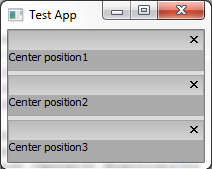
  • Position
    • Position lets you place multiple items in a single area
    • If you're using left,center, or right position will stack items vertically
    • For top or bottom position will stack items horizontally
    • The code for the below test application can be found here: http://fpaste.org/HQ7E/
  • Row
    • Like positions, rows also let you stack multiple items in one area
    • Rows behave opposite positions, in left, center, and right items stack horizontally, etc
    • The code for the below test application can be found here: http://pastebin.com/sJLTyVsL

  • Layer
    • Notice in the above examples that when the left label is given a higher layer it takes up a global left position instead of a local left position, this is what I meant by higher layers 'trumping' lower ones

For those of you who haven't guessed yet, let me put this right out there for you, you can combine layers, positions, rows, and directions any which way you please. What does this mean? It means you can easily organize your content pretty much anyway you can think to mix and match these various control features.

Consider the below example:
We've created three sets of rows with two positions so we can stack both horizontally and vertically in one area. You can combine most any of these features. Experiment! Get a feel for how the various properties combine, it's the best way to learn. Code for the above example can be found here. I hope this example helps!


Followers